Registration
I accepted a Parcoursup offer for my freshman year
Step 1: CVECPayment (available starting June 1, 2026)
I pay my CVEC (Student and Campus Fee) and print out my receipt; it is required for my registration.
Article L841-5-1 of the Student Guidance and Success Act (ORE) provides for the payment of the Student Life and Campus Contribution.
Step 2: REGISTRATION ONLINE: REQUIRED afterthe high school graduation exam results are released (July 8!)
Please note: I will be asked to pay by credit card .
Step 3: ACTIVATING MY ACCOUNT
Once I've completed my online registration, I'll receive an email containing my login credentials to activate my Digital Workspace (ENT) (please note: the link is only valid for 24 hours; check your spam folder if you don't receive it).
Here is important information about verifying your computer account.
Step 4: SUBMISSION OF SUPPORTING DOCUMENTS
In the accepted file formats (JPEG, PDF) via the PJ Web app (thumbnail available in the digital learning environment)
– I submit the sworn statement, and if I am a minor, I download and submit the corresponding authorization form.
– I will downloadthe certificate of compliance with the IT Policy and the school rules, as well as the image rights release form, and bring them back to the school office, signed, at the time of the final appointment.
– I check on PJ WEB to make sure my documents have been approved; if they haven't, I'll receive an email.
– If all the documents are approved, I can download my enrollment certificate from the “My File” tab on my digital learning platform.
Step 5: SCHEDULE AN APPOINTMENT VIA SMART AGENDA REQUIRED
– To show my national ID card.
– To submitthe certificate of compliance with the IT Policy and the internal regulations
– To pick up my student ID, I will have my photo taken at that time
I don't wait for my documents to be approved before making an appointment.
I am re-enrolling in the 2nd or 3rd year of my initial training program
Please note: For students awaiting their results (postponed internships), REGISTRATION IS ONLY POSSIBLE AFTER THE EXAMINATION COMMITTEE MEETING ON September 3, 2026!
I am paying theCVEC. Article L841-5-1 of the Student Orientation and Success Act (ORE) requires payment of the Student Life and Campus Contribution.
I MUST, without exception, re-register online after the July 8 evaluations:
- I log in to my digital workspace
- I click on the "Re-enroll" thumbnail
- I will download and printthe sworn statement
- Certificate of Right to One's Own Image
- I will uploadthe supporting documentsin the accepted formats (JPEG, PDF) to the PJWEB application (a thumbnail is available in the digital learning environment)
I'll make an appointment on Smart Agenda to renew my student ID card (CMS) and bring the following completed documents: the certificate of acceptance of the IT charter and the student handbook,
If my application is complete, and once it has been reviewed and approved by the registrar's office, I will be able to print my enrollment certificate.
I am re-enrolling in the 2nd or 3rd year of a work-study program (apprenticeship or professional training contract)
Please note: For students awaiting their results (postponed internships), REGISTRATION IS ONLY POSSIBLE AFTER THE EXAMINATION COMMITTEE MEETING ON September 3, 2026!
- I am paying theCVEC. Article L841-5-1 of the Student Orientation and Success Act (ORE) requires payment of the Student Life and Campus Contribution.
(I don't need to join the CVEC if I enroll in a professional training contract or through the Continuing Education Department.)
- I log in to my digital workspace
- I click on the “Re-enrollment” thumbnail after the jury’s decision on September 3, 2026
- I will download and printthe sworn statement
- Certificate of Right to One's Own Image
- I will uploadthe supporting documentsin the accepted formats (JPEG, PDF) to the PJWEB application (a thumbnail is available in the digital learning environment)
- I will contact the CFA to get permission to enroll once the contract is approved
- Once I received the certificate of enrollment, I enrolled at the IUT
- I’ll schedule an appointment on theSmartAgendaapptocomplete my registration (important: appointment slots must be scheduled with the admissions office as soon as I receive the certificate of enrollment issued by the CFA)
- I’m waiting to receive authorization from the CFA and the IUT, and I’ll go to the IUT on the day of the appointment, bringing with me:
- Visit the website ofthe Languedoc-Roussillon Apprentice Training Center
- Please note:If I am eligible for a Continuing Education program(job seeker, employee, or someone who has taken a break from studies) ora vocational training program, the Registrar’s Office will not handle my administrative registration; in this case, I must contact theContinuing Education Officebyemail or by phone at 04 34 43 21 21 (and I should not schedule an appointment via Smart Agenda).
Enrollment for International Students
Contact the International Relations Office at iutb-international@umontpellier.fr
Claims Regarding Administrative Registrations
Before filing a complaint, you should contact the registrar's office at your department to see if they can provide a quick and simple answer.
Only if that is not the case should you fill out the“Complaint”form, in which you will describe the steps you have taken.
You will receive a confirmation of receipt at the email address you provided on the form.
OTHER CLAIMS:
For any other inquiries not related to administrative registration, please submit your request by email toiutb-pole-scolarite@umontpellier.fr
Thank you for your attention. Please feel free to contact us if you need any further information.
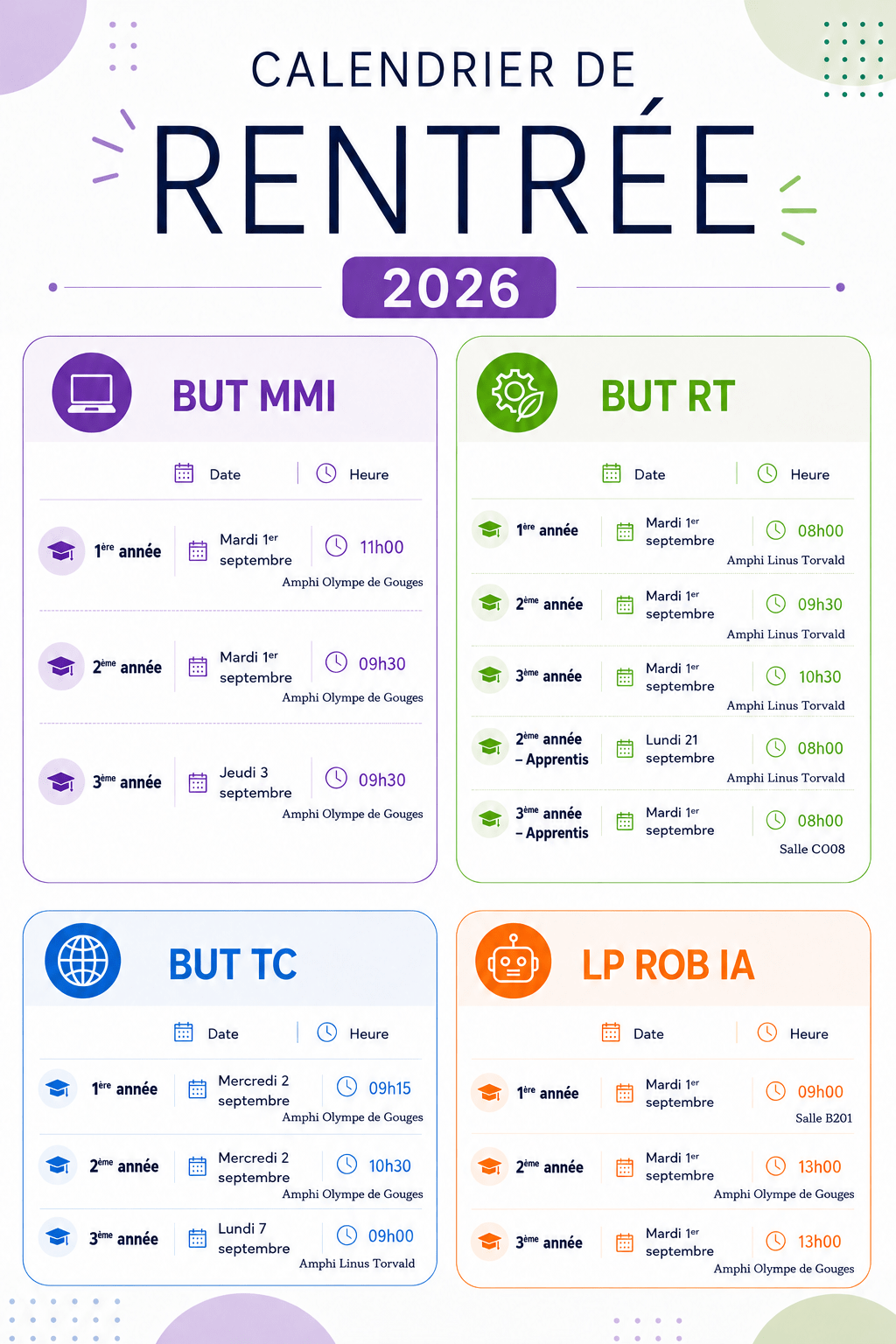
2026–2027 School Year Start and Holiday Calendar